If you write regularly — as a student, blogger, or professional — a few browser-based tools can save a lot of time. This guide covers 5 free online text tools on EzyToolz that handle common writing tasks: text to speech, plagiarism checking, spell checking, word counting, and text summarising. No downloads, no signup, no cost.
That’s exactly what EzyToolz.com provides. Here are 5 of the most useful free online text tools for students, writers, and professionals. Get ready to discover the secret weapons that will change the way you write in 2025.
1. Free Text to Speech Converter

What It Does: This Text to Speech (TTS) tool leverages the advanced speech synthesis technology built directly into modern web browsers to function as your personal online text reader. When you provide text, the tool uses your browser’s native engine to process it according to your selected voice and settings, creating a remarkably natural sounding text to speech output. It effectively gives a voice to your written content, allowing you to convert an article to audio for free without needing any external software or installations.
How to use: Using this tool is a straightforward process designed for efficiency:
- Provide Your Content: Begin by typing or pasting your desired text into the input field. For longer documents, you can use the convenient upload icon to load content directly from a .txt file.
- Choose Your Voice: Explore the dropdown menus to select a preferred language and then choose from a variety of male and female voices, often with distinct regional accents.
- Fine-Tune the Audio: Customize the listening experience by using the dedicated sliders to adjust the audio’s pitch (how high or low the voice is) and rate (the speaking speed).
- Initiate Playback: Click the “Speak” button to start the audio conversion. You have full control with “Pause,” “Resume,” and “Stop” buttons for easy playback management.
Key Features:
- Browser-Native Technology: Utilizes your browser’s built-in speech synthesis for fast and reliable performance.
- Extensive Voice & Language Options: Offers a wide selection of languages and voices to suit your needs.
- Full Audio Customization: Provides granular control over both the speed and pitch of the generated voice.
- No-Cost, Unlimited Access: This tool is completely free to use without any restrictions or signup requirements.
- Privacy-Centric Operation: As a client-side tool, your text is processed in your browser and is never sent to a server, guaranteeing your data’s privacy.
Use Cases:
- Enhanced Accessibility: Serves as a vital resource for individuals with visual impairments or reading difficulties like dyslexia, aligning with the principles of the Web Content Accessibility Guidelines (WCAG).
- Auditory Learning: An excellent study aid for students who prefer to listen to their notes, articles, or e-books to improve retention and comprehension.
- Effective Proofreading: Hearing your own text read aloud is a powerful method for catching grammatical errors, typos, and awkward phrasing that might be missed by eye.
- Effortless Content Creation: Generate high-quality voiceovers for presentations, e-learning modules, or YouTube videos without needing a microphone or recording software.
- Productive Multitasking: Listen to documents, reports, or news articles while driving, exercising, or doing other tasks, turning downtime into productive time.
2. Free Plagiarism Checker
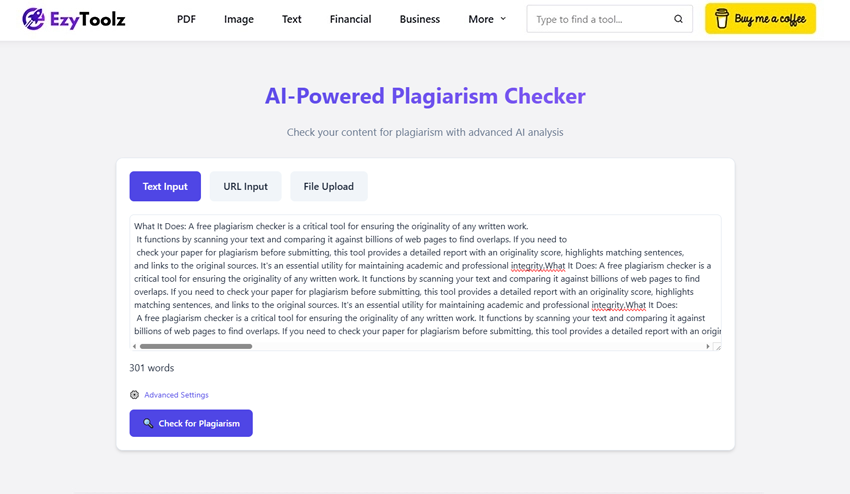
What It Does: A free plagiarism checker is a critical tool for ensuring the originality of any written work. It functions by scanning your text and comparing it against billions of web pages to find overlaps. If you need to check your paper for plagiarism before submitting, this tool provides a detailed report with an originality score, highlights matching sentences, and links to the original sources. It’s an essential utility for maintaining academic and professional integrity.
How to use:
- Selecing Input Method: To check for plagiarism, there are multiple input methods you can choose from when it comes to checking content: uploading a document of any format such as DOCX, PDF or TXT file or pasting text directly or entering URL’s of websites that you want checked against plagiarism.
- Start Your Check for Plagiarism Now: To initiate real-time analysis, press the “Check for Plagiarism” button.
- Discover a Detailed Report: Review the detailed report that displays highlighted matches and provides a percentage score.
- Get Your Report Here: For your records, download a comprehensive plagiarism report in PDF format here.
Key Features:
- Key Attributes: Paste text, URLs or documents that need to be checked for plagiarism.
- Complete Reporting: Includes an originality score, percentage and color-coded text.
- Source Verification: Direct links to the original web pages have been included for easy source verification.
- Secure and Private: We do not store or distribute the text you submit.
- Downloadable Reports: Plagiarism detector is an indispensable tool for educators and learners, offering users an ability to download a comprehensive PDF report of any detected plagiarism.
Use Cases:
- Students: An essential tool to verify the originality of essays and research papers to avoid academic penalties. For more on this topic, refer to the resources on academic integrity from Purdue OWL.
- Teachers & Educators: It is crucial that student work be checked immediately for academic integrity.
- Bloggers & Content Writers: check their articles for duplicate content penalties to ensure they rank highly on Google.
- Authors and journalists: Take care in creating work that is distinctive in order to preserve your professional standing.
3. Advanced Spell Checker
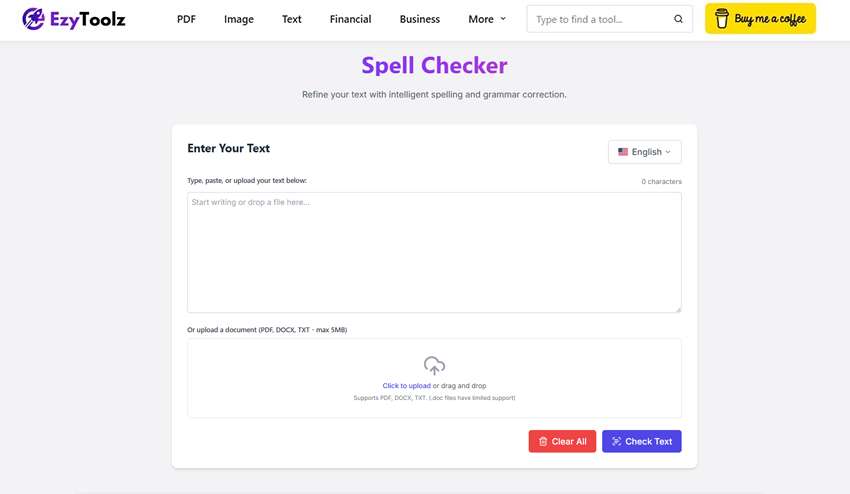
What It Does: An online spell checker is a writer’s best friend. This comprehensive proofreading assistant identifies spelling mistakes by comparing your text against extensive dictionaries. It can even auto-detect the language of your text. For anyone needing to check spelling in a PDF document or Word file, this tool allows you to upload entire documents, highlighting potential errors and providing intelligent suggestions for polished, error-free writing.
How to use:
- Provide Your Text: Type, paste or upload PDF, DOCX or TXT files of text.
- Select Language (Optional): Select one or more specific languages manually to conduct more targeted checks.
- Check for Errors: Clicking “Check Text” allows you to instantly see highlighted mistakes.
- Review and Correct: Click any errors to see suggestions and replace it in one step with just a click. Additionally, custom words can be added directly into the dictionary for use during sessions.
- Download or Copy: Download or copy the finished text version.
Key Features:
- Multi-Language Support: Check text in various languages with an auto-detect feature.
- Document Uploads: A powerful way to check spelling without manual copy-pasting.
- Interactive Corrections: Click on errors for smart suggestions and one-click fixes.
- Personal Dictionary: Temporarily add names or jargon to a session dictionary.
- Privacy-Focused: A secure tool that respects the confidentiality of your documents.
Use Cases:
- Professionals: An excellent online proofreading tool for reports, emails, and presentations.
- Students: Submit error-free essays and assignments.
- Bloggers & Marketers: Polish articles and marketing copy to build credibility.
- Non-Native Speakers: A great learning aid and the best spell check tool for non-native English speakers to improve their writing.
4. Free Text to PDF Converter

What It Does: A Text to PDF Converter is an invaluable tool with an efficient export feature, similar to an online text editor. It allows users to convert plain text into PDF documents easily, producing polished, widely shared documents that meet accessibility guidelines. In contrast to simple converters, Text to PDF Converter offers selectable text that ensures accessibility; and offers rich formatting toolbar options including margin settings, paper size management and orientation controls for high-quality PDF outputs.
How to use:
- Enter or Upload Your Text: Type, paste, or drag and drop a .txt file.
- Format Your Content: Use the rich text editor to apply headings, lists, and styles.
- Customize PDF Settings: Select Paper Size (e.g., A4, Letter), Orientation, Font Size, and Margins.
- Convert and Download: Click “Convert to PDF” to instantly generate and download your file.
Key Features:
- Rich Text Editor:An intuitive toolbar designed for editing text before conversion.
- Selectable Text Output: Creates high-quality PDFs featuring searchable and copyable text.
- Full PDF Customization: Adjust margins, orientation and paper size as you see fit.
- Complete Privacy: Your data never leaves your browser with this safe text-to-PDF converter that operates directly within it.
- File Uploads: Allowing fast conversion of existing drafts through support for uploading of.txt files.
Use Cases:
- Students: The perfect way to save plain text as a PDF for submitting assignments in a professional format.
- Professionals: Quickly generate shareable PDFs of meeting notes, memos, or basic invoices with just a few clicks.
- Writers & Bloggers: Compose attractive article drafts to present to editors for consideration.
- Anyone: Create a PDF document from any simple recipe or list and make it professional-looking and readable for all to see!
5. Free Text Summarizer
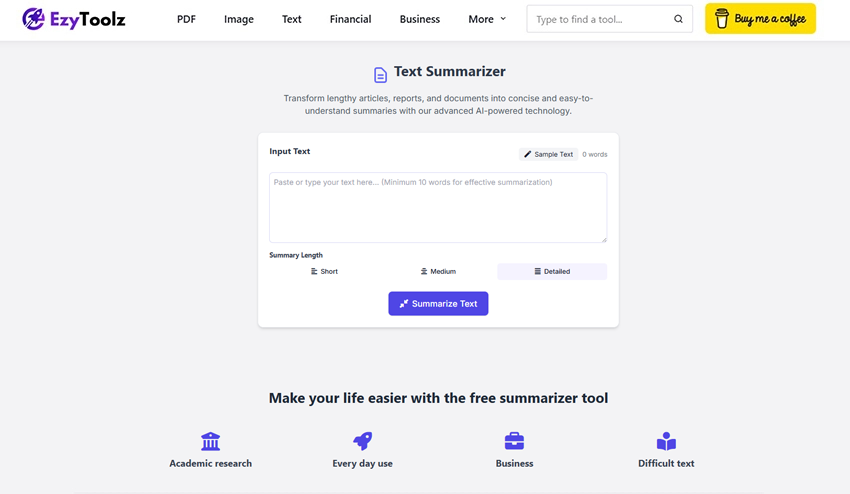
What It Does: A text summarizer is an artificial intelligence (AI) tool designed to condense lengthy articles or reports into an easily understandable synopsis for you in order to save time. The Ezytoolz version offers flexible article summarizer capabilities with the option for you to control its length of summary output.
How to use:
- Paste Your Text: Copy and Paste Your Text: Within the input box, copy and paste all of the text you would like summarized.
- Choose Summary Length: Choose between “Short,” “Medium,” or “Detailed” summary lengths.
- Click “Summarize Text”: The AI will instantly process the text and generate a summary.
- Copy the Summary: Once generated, the output box will display a brief synopsis which is ready for copying and pasting.
Key Features:
- AI-Powered Summarization: Precisely extract essential concepts using complex algorithms.
- Adjustable Summary Length: This free text summarizer offers endless uses and can be utilized in various ways.
- Fast and Efficient: Summaries delivered quickly, drastically reducing reading time.
- Word Count & Reduction Stats: Provides statistics regarding the percentage of reduced word counts along with original and new word counts.
- Simple Interface: Simply click, select, and paste to get going.
Use Cases:
- Students & Researchers: A great way to quickly summarize research papers and understand key ideas of scholarly publications quickly and efficiently.
- Professionals: For speedy decision-making, summarise lengthy emails or business reports into their most essential points.
- Content Curators: Compile digested summaries of longer articles for newsletters or social media channels.
- Anyone with Limited Time: A great way for professionals and students to quickly understand the key ideas in any text quickly and efficiently.
Conclusion
Finding the best free online text tool has become crucial to efficiently producing high-quality work because every advantage matters when creating content. Each of the tools listed here has a distinct but crucial function, ranging from using spell checkers to producing polished documents with text to PDF converters.
The free online text tools from EzyToolz.com can help you write better than ever before, save time, increase productivity, and make sure every piece of content you create is polished, clear, and professional. By adding these crucial text tools to your toolkit, you can give yourself an advantage right now!
Frequently Asked Questions (FAQ)
Do these tools have any hidden fees or are they really free?
EzyToolz is committed to providing easily accessible resources without any hidden costs or subscription paywalls that limit usage; our mission is to give writers access to strong tools at no cost!
How secure is my data when using these tools?
We take privacy very seriously. Because of this, the majority of our tools—such as Text to Speech and PDF converters—work client-side in your browser, so your data never even makes it to our servers! Your work is always kept private with server-side analysis tools like Plagiarism Checker, which process all text securely without storing, sharing, or indexing it.
Do I need to complete any installation or registration steps before I can begin my journey?
Not necessary! Our suite was created with efficiency and instant access in mind; there is no software to download or registration process to hold you up. Simply go to the website, pick your preferred tool, and start increasing productivity immediately!
Do the tools have mobile device optimization?
Yes. Our platform was designed with mobile devices in mind. Working from smartphones, tablets, or desktop computers will be easy and intuitive, allowing you to be as productive as possible at any time or place!
What distinguishes EzyToolz.com from other websites that provide free online text tools?
Three fundamental principles form the basis of our philosophy: productivity, privacy, and power. We offer top-notch features without obtrusive advertisements or complicated user interfaces, ensuring data security, reducing registration hassles, and offering a simple way to get better at writing.