Want to take a free typing speed test online? Most people have no idea how fast they actually type — until they measure it. You sit down, start typing, and it feels fine — until you time yourself and realise you are doing 28 WPM when the job posting asks for 35.
The EzyToolz Typing Speed Test lets you check your typing speed online for free, practice regularly, and track your accuracy — no account needed, no software to install. Works on any device in your browser.
If you are preparing for a government exam that includes a typing test — SSC, CPCT, LDC, or state-level data entry — this tool gives you a typing master practice test environment to prepare properly.
Government Exams That Require a Typing Test
In India, typing speed is a qualifying criterion for dozens of government jobs. If you are preparing for any of these, you need to know your current WPM and practice consistently:
| Exam / Post | Required WPM | Note |
| SSC CHSL / MTS (LDC) | 35 WPM | English typing — qualifying in nature |
| SSC CGL (Data Entry) | 8,000 KDPH | Key depressions per hour, not WPM |
| CPCT (Madhya Pradesh) | 30 WPM | Mandatory for state govt jobs in MP |
| LDC / Clerk (State PSC) | 25–35 WPM | Varies by state — check notification |
| Railway Clerk / NTPC | 30–35 WPM | Typing test in select posts |
| High Court Stenographer | 80–100 WPM | Shorthand + typing combination |
| Practice in the same language as your exam Most government typing tests are in English. Some state exams — CPCT, UP, Bihar — include Hindi typing. The EzyToolz tool currently supports English. For Hindi typing practice, use a separate dedicated tool. |
Free Typing Speed Test Online — What It Includes
The tool was built to give you more than just a timer. Here is what you get:
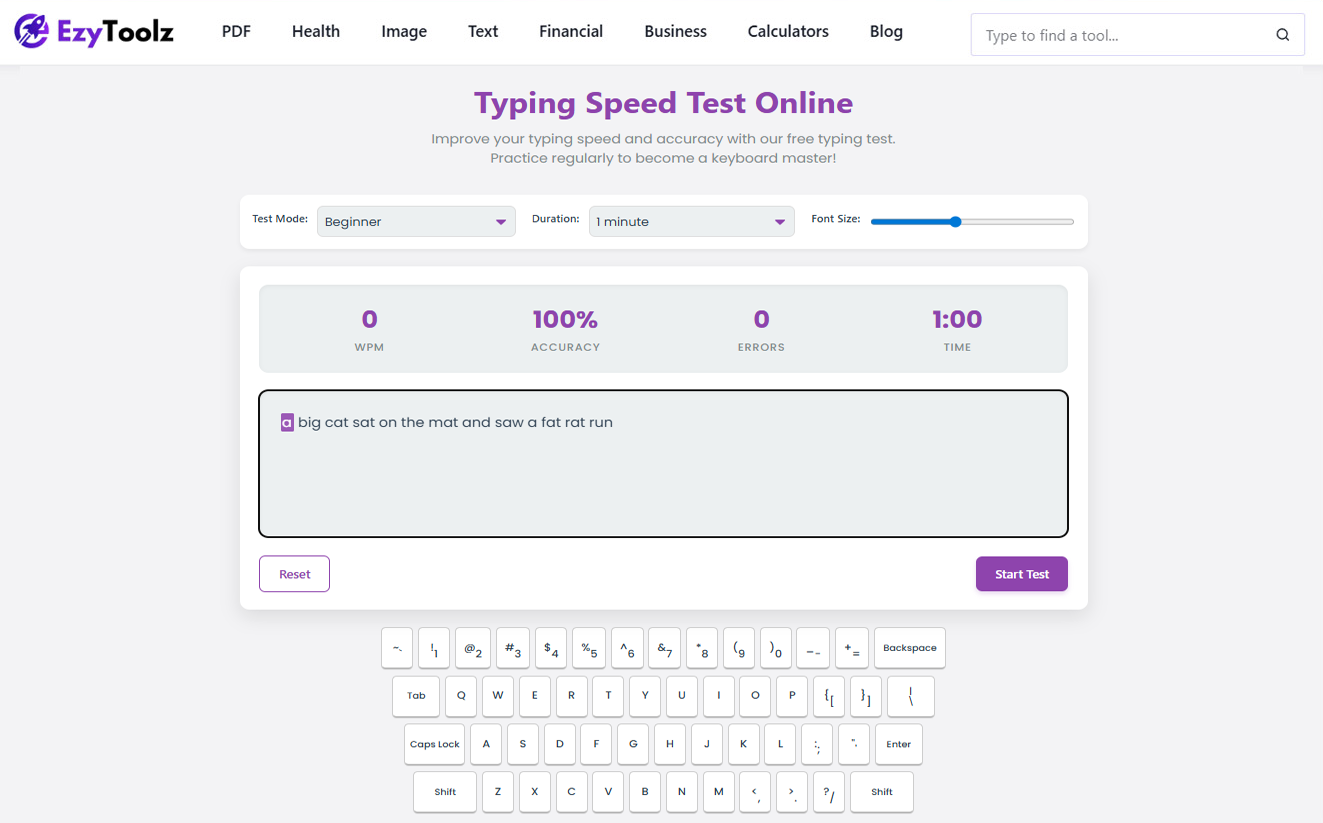
- Multiple difficulty modes: Beginner, Intermediate, Advanced, Code, and Quotes. Start at Beginner if you are new, move up as your speed improves.
- Flexible test duration: 30 seconds for a quick check, or 1, 2, and 5-minute tests to build endurance. Government exams typically run for 10–15 minutes — use longer sessions to build stamina.
- Live WPM and accuracy: Your speed and accuracy update in real time as you type. You do not have to wait until the end to see how you are doing.
- Error highlighting: Correct letters turn green, mistakes turn red. Instant visual feedback helps you catch problem keys immediately.
- On-screen keyboard: A virtual keyboard lights up with each keypress — useful for learning touch typing and identifying which fingers are causing errors.
- Detailed results: At the end, you see WPM, accuracy percentage, and total error count — along with suggestions for improvement.
How to Use the Typing Speed Test — Step by Step
- Go to the tool: Open ezytoolz.com/text/typing-speed-test/ in your browser. This free typing speed test online works on any browser — no download, no account.”
- Choose your mode and duration: Select a difficulty level and test length from the dropdown menus. For exam prep, use Intermediate or Advanced with a 2 or 5-minute duration.
- Click inside the text box: That is all the setup needed. The timer starts the moment you type your first character.
- Type the displayed text: Focus on accuracy first, speed second. Green = correct, red = error.
- Review your results: When the timer ends, check your WPM, accuracy, and error count. Note which keys cause the most mistakes.
- Practice again: Repeat the test. Consistent daily practice — even 10 minutes — improves speed faster than occasional long sessions.
Understanding Your Typing Test Results
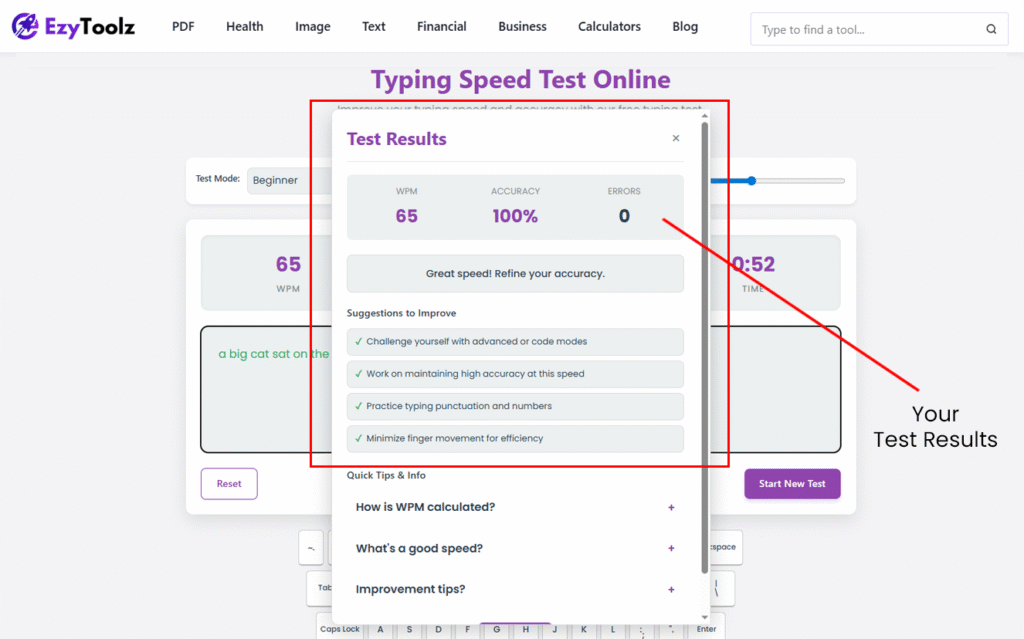
Three numbers matter in your results:
- WPM (Words Per Minute): Your typing speed. Each ‘word’ is counted as 5 characters, including spaces. This is the standard measure used in all typing tests and job requirements.
- Accuracy: The percentage of characters you typed correctly. Aim for 95% or above. High speed with low accuracy is not useful — most government exams have an accuracy requirement alongside WPM.
- Errors: Total mistakes made. Fewer errors = better muscle memory. If your error count is high on specific letters, those are your weak points to target.
| WPM | Level | What it means |
| Under 25 | Beginner | Focus on accuracy over speed. Learn home row positioning first. |
| 25–35 | Developing | Average for most people starting out. Sufficient for basic data entry. |
| 35–50 | Competent | Meets most government exam requirements. Good for office work. |
| 50–70 | Proficient | Comfortable for professional use. Above average for most job roles. |
| 70–90 | Fast | Top tier for most contexts. Required for stenography and court reporting. |
| 90+ | Expert | Professional typist level. Most people do not need this for standard jobs. |
Which Practice Mode Should You Use?
Choose based on where you are right now and what you are preparing for:
- Beginner: Short, common words. Start here if you are below 25 WPM or learning touch typing from scratch. Builds foundation without overwhelming you.
- Intermediate: Longer sentences with standard punctuation. Use this when you are consistently above 30 WPM. Good for SSC and general office exam prep.
- Advanced: Complex vocabulary and long paragraphs. Use this when you are above 45 WPM and want to push further.
- Code: Real programming syntax — brackets, symbols, mixed case. Built for developers who type code all day and want to improve technical typing speed.
- Quotes: Well-known quotes in varied sentence structures. A good change of pace when regular practice feels repetitive.
Tips to Improve Your Typing Speed — What Actually Works
Speed comes from accuracy and muscle memory, not from trying to type faster. Here is what makes a real difference:
- Learn the home row position first: Left hand on A S D F, right hand on J K L ;. Your fingers should return here after every keystroke. This is the foundation of touch typing — everything else builds on it.
- Stop looking at the keyboard: It feels slow at first, but this is the single most important habit to build. Your speed will drop before it rises — that is normal. Push through it.
- Accuracy before speed: Deliberately slow down until your accuracy is consistently above 95%. Speed follows accuracy naturally — the reverse rarely works.
- Practice the specific keys causing errors: If your results show frequent mistakes on ‘b’, ‘y’, or number keys — those are your weak fingers. Spend 5 minutes on those specifically before running a full test.
- Short daily sessions beat long occasional ones: 10 minutes every day improves speed faster than one hour on weekends. Muscle memory builds through repetition over time.
- Sit properly: Elbows at 90 degrees, feet flat, screen at eye level. Uncomfortable posture causes fatigue quickly and slows you down in longer tests.
| For government exam prep — practice in exam conditions Most typing tests in SSC, CPCT, and railway exams run for 10–15 minutes continuously. Take 10-minute practice sessions — not just 1-minute speed checks — so your fingers and focus are used to the duration. Use the 5-minute mode on EzyToolz as a starting point. |
Frequently Asked Questions
Is the EzyToolz typing speed test free?
Yes — completely free. No signup, no account, no daily limit. Open the tool and start typing.
What is a good typing speed for government exams in India?
Most SSC and state government exams require 30–35 WPM in English. CPCT requires 30 WPM. Stenography posts require 80–100 WPM. Check the specific notification for the exam you are preparing for — requirements vary.
How is WPM calculated?
WPM is calculated by counting total characters typed divided by 5 (the standard ‘word’ length), then dividing by the number of minutes elapsed. Errors are usually subtracted from the gross WPM to give you a net WPM.
How long does it take to improve typing speed?
Most people see noticeable improvement in 2–4 weeks of daily 10-minute practice. Going from 25 WPM to 40 WPM typically takes 4–6 weeks of consistent practice. Speed plateaus are common — push through them by focusing on accuracy.
Does the tool work on a phone or tablet?
The typing test is designed for keyboard use — it works best on a laptop or desktop. On a phone with an on-screen keyboard, the experience is not ideal for serious practice. Use a physical keyboard for accurate speed measurement.
What is the difference between gross WPM and net WPM?
Gross WPM is your raw typing speed including errors. Net WPM subtracts errors — it reflects your practical typing speed. Most job requirements and exams use net WPM. Always aim for high accuracy alongside speed.
Start Practicing – It Gets Better Faster Than You Think
Whether you are checking your speed out of curiosity, preparing for an SSC or CPCT typing test, or just want to type faster at work — consistent practice with the right feedback makes a real difference.
Ten minutes a day is enough to start. Take your first test now to see where you stand, then track your improvement over the next few weeks. Take the free typing speed test online now and see your starting WPM.