Have you ever found yourself typing an entire paragraph in all-caps by accident, or needed to quickly convert a list of names into Title Case? In our digital world, how your text appears makes an important statement. Simple capitalization issues or formatting mistakes can detract from an effective message, making it look unprofessional. Fixing these problems manually is both time-consuming and error-prone, which is why a powerful text case converter online can be a real lifesaver.
At EzyToolz, we’re proud to introduce an outstanding text case tool with numerous features and an exceptional user experience. Welcome to your ultimate walkthrough of a free browser-based tool that goes well beyond basic formatting; let us show you how you can clean, analyze, and transform text effortlessly all at the same time – for free.
Key Features at a Glance
Our online text case converter offers more than meets the eye; it provides a comprehensive set of tools designed to manage all your text manipulation needs in one central place.
- Complete Case Conversion: Immediately change text capitalization between uppercase, lowercase, sentence case and title case as needed – uppercase/lowercase, sentence/title case capitalizing, lettercase (capitalize word), letter/sentence case capitalization. Also available are alternate case formats like LongenaTing CaSe and Togggle Case for easy conversion between capitals of text.
- Advanced Text Editing: Take advantage of powerful tools such as Find & Replace, Eliminate Extra Spaces and Eliminate Duplicate Lines when editing advanced texts.
- Comprehensive Text Analysis: Use word/character counters or even word & character frequency analysis tools for instantaneous insights.
- Practical Features: Count the number of lines, flip your text, and more.
- User-Friendly Interface: For optimal use across devices, our design features an easy, user-friendly experience that works flawlessly on all.
- Your browser is used for all transactions, ensuring your privacy; no server ever receives your text.
- Free of Charge: With no restrictions, sign-ups or subscriptions.
How to Use the Tool
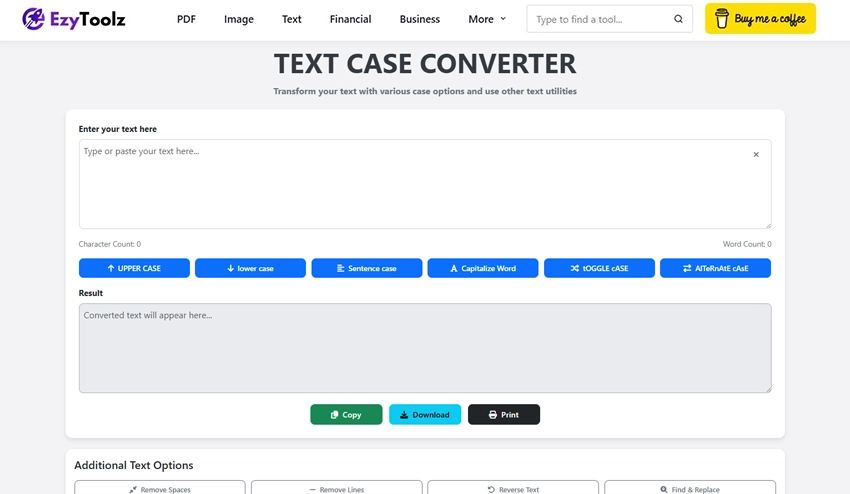
This online text case converter was designed for ease of use and makes the entire process of changing case easier than ever before. Simply follow these steps to convert and format text quickly:
- Copy and Paste Text: In the main input box, copy and paste any text you would like to alter or type directly into it. Another alternative would be typing directly into this field.
- Select Your Conversion: Below the input box are several buttons offering various case conversions. For instance:
- To convert text to uppercase, click “UPPER CASE.”
- To capitalize the first letter of each sentence, choose “Sentence case.”
- To use the title case converter for headlines, click “Capitalize Word.”
- Check Your Outcome: The “Result” box below will instantly display any converted text.
- To utilize your newly formatted text wherever it may be necessary, use one of the “Copy,” “Download,” or “Print” buttons found under the result box.
Simple! The application offers an effortless experience for rapid and effective text formatting.
Who Needs This Tool and Why?
Text formatting tools have many practical uses for professionals across various fields, making them indispensable tools. Here are a few benefits users of these text formatting tools can reap:
- ✅ Authors and Editors: Presentation is key for content producers. To follow style guidelines provided by Purdue Online Writing Lab (OWL), writers may utilize this proper case text converter to ensure all headings adhere to Title Case format, past text from multiple sources correctly into body paragraphs using sentence case converter and meet length requirements without switching programs using word count and character count tools.
- ✅ Developers and Data Analysts: Developers often face logs, unruly data strings, and user-generated content that require normalizing. By employing the “Remove Duplicate Lines” feature, developers could quickly tidy up a list of entries or convert text to lowercase for consistent data processing. Meanwhile, for fast code snippet or configuration file refactoring purposes the “Find & Replace” function provides ideal solutions.
- ✅ Digital Marketers and SEO Experts: For effective on-page SEO, formatting is of utmost importance. An SEO expert can use the Title Case Converter to produce professionally formatted H1 headings and meta titles with Google-approved length limits thanks to an integrated Character Counter feature in Meta Description Character Manager; its integrated Character Counter also ensures snippet length compliance based on Google’s suggestion length limits – ideal for keeping headlines, ads copy, social media posts readable and impactful!
- ✅ Students & Academics: It is vital for students to follow strict formatting requirements and deadlines at all times, which makes this tool invaluable to ensure headings and titles of essays are capitalized correctly and formatting bibliographies or lists of references with ease using case text converter can save both time and help avoid any failure grades due to poor presentation.
- ✅ Marketers & Social Media Managers: Marketing involves crafting eye-catching headlines and clear calls-to-action (CTAs). Marketers looking to test various capitalization styles (for instance using uppercase for emphasis in CTAs) quickly can experiment with text capitalization changes for testing different ad copy variations rapidly via instantaneous text changes.
Advanced Tools for Smart Editing
Beyond simple case conversion, this free online text formatter does more. It is a robust text case converter with several sophisticated tools for optimal control over writing.
🔁 Find & Replace
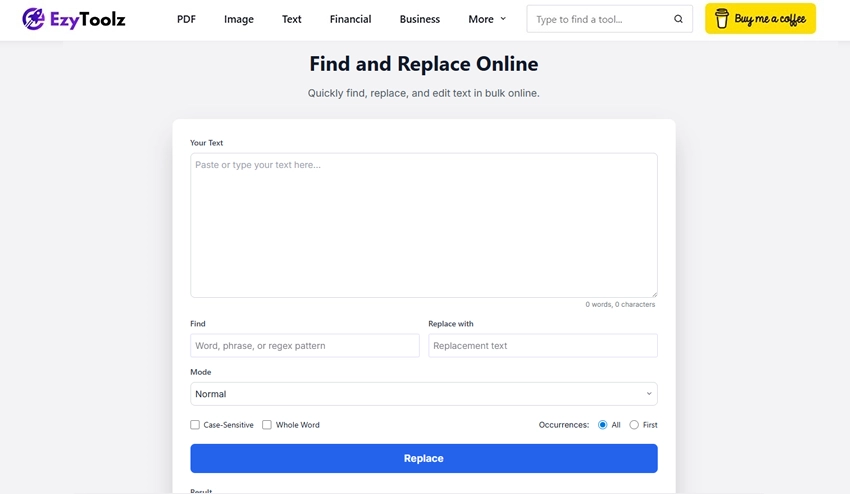
One of the most potent features is Locate and Swap Out, which allows you to automate the process of finding words or phrases to change rather than manually doing so. Simply enable “Find & Replace,” type in what text you’re searching for, type out what would replace it and click “Replace.” It’s perfect for quickly swapping out placeholders, modifying names throughout documents or correcting frequent spelling errors.
🔠 Word and Character Frequency Counters
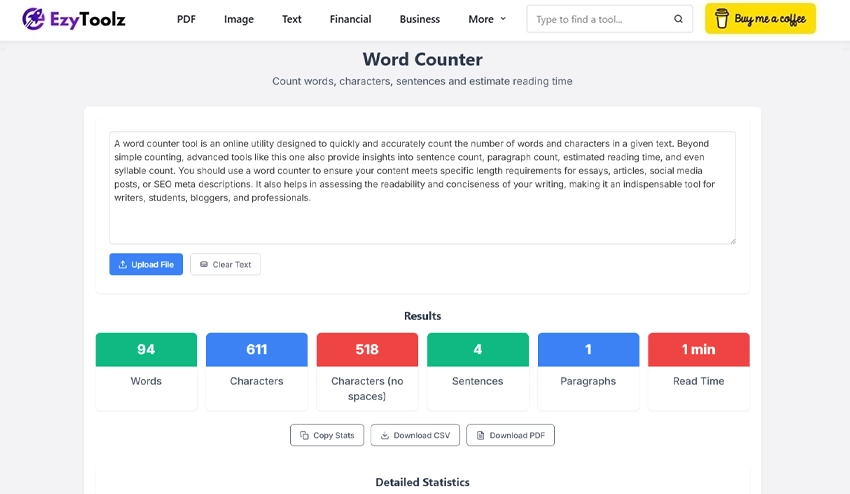
After analyzing your text, the “Word Frequency” tool creates a list of all words and their frequency of occurrence – perfect for writers looking to avoid repetitious language or SEO analysis (to check keyword density). Meanwhile, “Character Frequency” deconstructs how each character–including punctuation and spaces–is used.
🧹 Remove Extra Spaces / Duplicate Lines
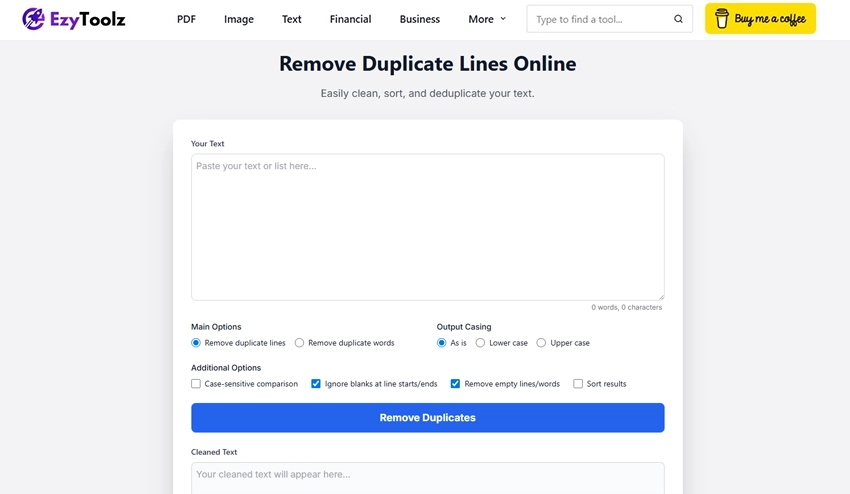
Uneven spacing and extraneous lines are hallmarks of messy text, often appearing as inconsistent spacing or lines that appear duplicated in different places in a line of text.
- Eliminate Extra Spaces: Your text will appear neat and evenly spaced after a single click to eliminate double spaces and reduce leading and trailing whitespace.
- Eliminate Duplicate Lines: This tool is an indispensable resource for organizing log files, lists, or any text where every line must be distinct. Your text is instantly scanned for repeating lines that need to be deleted – any lines with similar syntaxes are immediately eliminated from consideration.
🔄 Reverse Text Tool
The online reverse text generator tool can be both entertaining and sometimes useful; its niche functionality offers you complete text manipulation from character by character in reverse! Perfect for light data obfuscation, social media posts or basic puzzles!
🔢 Line Counter
Unlike manually counting or depending on an estimate from a word processor, our “Count Lines” tool provides instantaneous and reliable count results that provide immediate answers.
Security & Privacy: Never Losing Text
In today’s age of data breaches, it can be unnerving to trust online tools with your text. At Text Cleanup Tool we took an “anti-privacy-first” approach when designing our text cleanup tool. From case conversion to search-and-replace, all the processing takes place directly within your web browser – client-side processing. No text is sent or stored on our servers – once you close the tab it’s gone forever and this makes us one of the safest text tools that doesn’t require a login online.
Conclusion
Text tools must be quick, dependable, and flexible in order to be of any use for any task, whether editing and proofreading the final draft, normalizing data sets, optimizing meta tags for search engine optimization purposes, or formatting an essay. Manually correcting capitalization mistakes, eliminating extra spaces between words or counting words takes too much of our precious time resources.
Our free text case converter online is more than just a tool; it is an advanced text editing platform designed to elevate the quality and speed of your work while streamlining workflow. With its comprehensive feature set that includes everything needed for formatting, cleaning and perfecting text instantly – from simple case changes to advanced analysis tools – finally eliminating manual text editing for good!
FAQs About the Text Case Converter Tool
What is the difference between a sentence case converter and a title case converter?
As only the initial letter of each sentence’s first word (and, in more complex reasoning situations, proper nouns) is capitalized in sentence case, for example: “This is a sentence. Here’s another one.” Create a Capitalization Word (also referred to as Proper Case or Title Case) capitalizes each word’s initial letter for ease. For instance, “This Is A Title Of A Book.” Our tool capitalizes the first letter of every word to ensure easy usage.
Is this text case converter online free to use?
Absolutely not! You are free to utilize our Text Case Converter and all its associated text utility features without incurring subscription fees, hidden costs or usage restrictions.
How secure is my data when using this online tool?
Data security and privacy are of utmost importance. Your browser handles all text processing and conversion (client-side). This means that no text is saved on our servers; rather it simply disappears as soon as you leave the page or close the browser window.
How will this tool assist with my SEO?
Consistent capitalization is just one example of how proper text formatting directly affects readability and user experience. Search engines such as Google favor easily readable and well-structured content; our tool can improve on-page SEO elements by correctly formatting headings, titles, body content, meta descriptions with word and character counters as well as optimizing meta descriptions with word and character counters.