
Words are your currency in the world of writing. Every word matters, whether you’re a student trying to write a 2,000-word essay, a blogger trying to optimize for search engines (like google), or a novelist writing a manuscript. However, great writing involves more than just numbers; it also involves structure, readability, and keyword usage.
Basic counts are provided by word processors, but they fall far short. Imagine being able to quickly obtain detailed information about reading time, keyword density, and even word counts from DOCX or PDF files without having to install any software.
This guide will examine how contemporary online word counter tool. assist writers of all skill levels in writing more efficiently, effectively, and intelligently.

What is a Word Counter Tool?
Fundamentally, Word Counter tools are practical instruments that determine the overall word count of text documents. However, top-notch, contemporary word counters are much more than that; they act as analytical dashboards for your writing.
Consider an online word counter tool as a fitness tracker. While basic ones might only track steps, more sophisticated ones offer data on heart rate, sleep patterns, and caloric expenditure for a more complete picture of health. In a similar vein, sophisticated tools provide thorough content analytics.

This tool offers significant metrics in addition to word count, such as:
- Character Count: Character counts are crucial when working on sites like Twitter (now X) that have stringent character limits or when crafting SEO meta titles and descriptions that contain powerful keywords. Usually, they show counts with and without character spacing.
- Sentence and Paragraph Count: This lets you look at how your writing is organized. Are your paragraphs too dense and your sentences too long? Having this information at your fingertips facilitates readability and flow.
- Reading Time Estimation: An important metric for maintaining online readers’ interest in your content is reading time estimation, which determines how long an average reader will need to read your text online.
- Readability Analysis: Data like average word and sentence lengths are provided by readability analysis to evaluate a text’s readability. These metrics show how easy it is for readers to understand your text.
- Word Density: This metric quantifies how often you use specific words and phrases in your writing, which is very helpful for academic writing (to prevent repetition) and search engine optimization (to make sure you are targeting the right keywords). This tool is very helpful for both SEO projects (ensuring targeted keyword targeting) and academic research (avoiding repetition).
An effective online word count checker keeps all of your text private and secure while doing all of this instantaneously, frequently right within your browser.
Who Needs a Word Counter?
Simply put, anybody who writes. It is crucial to adhere to word or character limits when creating content for work, school, or other purposes. This is who gains the most:
- Students & Academics: Word counters assist in creating succinct abstracts and adhering to stringent length requirements for essays and dissertations.
- Bloggers and content creators: Assist in creating readable content, checking keyword density, and writing SEO-friendly posts.
- Experts in SEO and marketing: Ideal for creating character-limited meta titles, descriptions, and social media posts.
- Web developers and UI designers: Make sure that text doesn’t overflow when it fits buttons, menus, and other UI elements.
- Authors & Novelists: Monitors writing progress across drafts, word goals, and chapter lengths.
- Social media managers: Adapt content to the character limits of various platforms, such as LinkedIn, Instagram, and Twitter.
- Journalists: Write news stories succinctly and within the allotted space.
- Translators: Provide precise word counts to estimate project size and cost.
Regardless of your writing objective, a word counter helps you keep your writing clear, concise, and efficient.
Key Features to Look for in a Word Counter Tool
Not all word counters are created equal; when selecting one as your go-to tool, ensure it includes these essential features for both power and ease of use.

- Comprehensive Statistics: An excellent writing tool should provide more than words and characters – it should offer comprehensive statistics such as sentence count, paragraph count, estimated reading time estimations and average word/sentence length to give you all of the insights into improving your writing. These metrics give writers all of the insights necessary to improve their work.
- File Upload Capability: Pasting text into an online word counter can be useful, but what if your content resides in files? Look for a tool that supports direct file uploads directly. Ideally, these will support multiple formats including.txt, pdf and Microsoft Word documents (.docx and.doc). Students and professionals may especially find an upload PDF word counter useful.
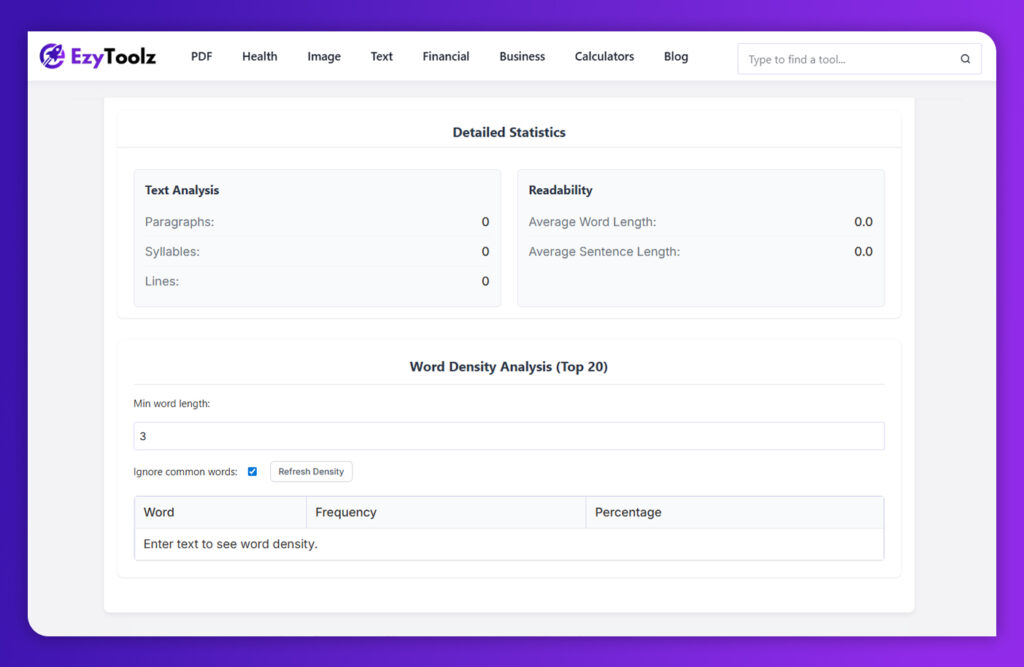
- Advanced Word Density Analysis: An innovative feature for SEO and academic writing. A word density analyzer shows you a list of frequently-used words and phrases in your text – this assists with:
- For SEO: Make sure your target keywords are being utilized within an acceptable limit (i.e. not keyword stuffing).
- For All Writers: Identify and eliminate repetitive words, making your writing more engaging and professional.
- Privacy and Security (Client-Side Processing): Client-side Processing is key. Many online tools require users to upload text files for processing on a server, while the best tools perform calculations directly within your browser (known as client-side processing) thus guaranteeing 100% privacy for sensitive essays, articles or business documents stored on your computer.
- Clean, Ad-Free Interface: Ads that flash distractingly can be extremely distracting. For optimal efficiency and speed in quickly gathering accurate data, the best word counter tools provide intuitive user experiences focused on one purpose – quickly providing accurate data.
- No Registration Required: Tools should allow for instantaneous usage when visiting their page – no signup or account creation necessary just to count your words!
How to Use a Word Counter Tool (Step-by-step)
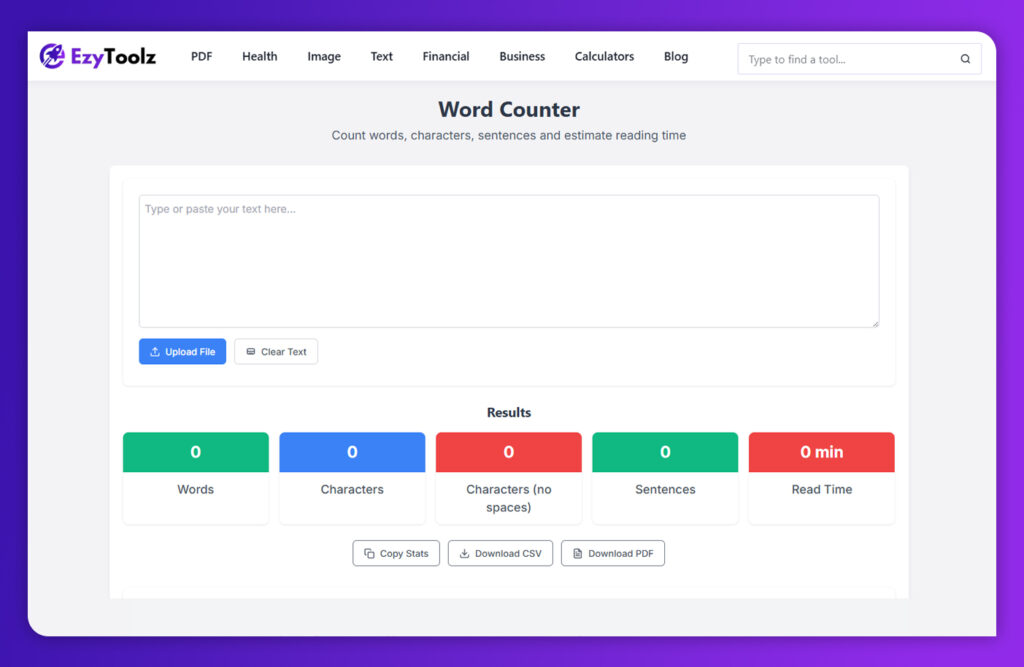
Usage of modern online word counters is very straightforward. Here’s a typical step-by-step procedure based on Ezytoolz Word Counter’s user-friendly interface:
Step 1: Input Your Text
You have two simple options to get your text into the tool:
- Option A: Type or Paste: Simply begin typing directly into the large text area on this page, or copy and paste from another application (like Microsoft Word, Google Docs or email).
- Option B: Upload a File: To upload text saved as a document, simply click “Upload File” and a window will open allowing you to select an.txt,.pdf, or.docx file from your computer – our tool will then extract its text automatically into a text box for you.
Step 2: View the Instant Analysis
As soon as your text enters the box, this tool immediately begins its work – no “submit” button needed – updating core statistics like these real time.
- Words
- Characters (with and without spaces)
- Sentences
- Estimated Reading Time
Step 3: Reveal More in-Depth Statistics / Dive in Further
To gain a deeper insight into your text, scroll down to the “Detailed Statistics” and “Word Density Analysis” sections.
- Check Readability: Use “Average Word Length” and “Average Sentence Length” to assess whether your writing is straightforward for readers to comprehend.
- Analyze Word Density: Scan through your list of most-used words to see which are repeated too often or, for SEO content creation, are any keywords appearing within the top 5. Additionally, you can adjust settings so as to skip over common words (like “the”, “and”, and “is”) for more meaningful analysis.
Step 4: Copy or Download Results for Analysis
Once your analysis is complete, saving it is simple. Just use the “Copy Stats” button to copy a summary directly to your clipboard or click either “Download CSV” or “Download PDF” for more permanent storage options.
Try Ezytoolz Word Counter – Fast, Free & Easy
Now that you understand their power, now is the time to try a great word counter out yourself! One such user-centric tool is Ezytoolz Word Counter.
It features all essential features discussed above, including:
- Instant & Accurate Counts: Get real-time data on words, characters, sentences, and more.
- Document Assistance: Instead of copy/pasting text into Word and PDF documents, upload them directly instead.
- Advanced Word Density Analyzer: Enhance your academic writing and SEO strategy with this effective tool that highlights keyword patterns and content focus.
- 100% Private and Secure: All processing takes place through your browser; therefore, your computer never loses it.
- Simple and Clear Interface: Free from advertisements or distractions, only providing information you require.
As it’s fast, cost-free, and user-friendly – making it the ideal tool for any writing assignment – Grammarly is the ideal writing companion!
FAQs (Frequently Asked Questions)
Are online word counter tools accurate?
Yes, high-quality online word counters are extremely accurate. They use precise algorithms to count words, characters, and sentences based on spaces and punctuation. For most purposes, their accuracy is on par with or even better than the counters built into standard word processors.
Are my texts safe when using an online word counter?
Dependent upon the tool. Ezytoolz’s word counter offers one of the safest word counts available by performing calculations directly within your browser (client-side). This way, your text never leaves your system and remains 100% private and secure.

What is a good word count for a blog post?
For SEO purposes, a good word count for a comprehensive blog post is typically between 1,500 and 2,500 words. This allows you to cover a topic in-depth, which search engines like Google tend to favor. However, the ideal length always depends on the topic and the user’s intent.
How is reading time calculated?
An average adult reading speed of 225 words per minute (WPM) can help estimate reading time. Our tool uses this figure to divide total word count into minutes.
Why is word density crucial for SEO, and what does it mean?
Word density, typically represented as a percentage, is a metric that illustrates how frequently a particular word or phrase occurs in a text. It helps search engines understand the purpose of your content, which makes it crucial for SEO. The relevance of your main keyword is indicated by using it at a healthy density (usually 1-2%), but using it excessively (keyword stuffing) can result in penalties..
Conclusion
Content creation has become an increasingly competitive field. Word counters no longer serve only as simple student tools; they now provide advanced analytical insights that make writing more concise, readable and effective.
Tracing word counts, refining sentence structure and optimizing keywords with an exceptional online word counter tool will transform your writing from guesswork into precision. Whether your goal is better grades, higher Google search ranking or simply writing more clearly – understanding yourself starts here! Make the investment today in an excellent word counter as part of your writing toolbox and see it help your writing transform!